


View on Amazon
UtechSmart USB-C Docking Station Review – The Ultimate Triple Display Workstation
In today’s productivity-driven world, having a powerful and flexible workstation is no longer a luxury—it’s a necessity. Whether you’re a remote worker, a creative professional, or a multitasker handling multiple applications at once, expanding your laptop’s capabilities can dramatically improve your efficiency.
The UtechSmart USB-C Docking Station is designed to do exactly that. With its impressive triple display support, wide range of ports, and compact design, it positions itself as a complete all-in-one solution for modern users.
Design & Portability
One of the standout features of the UtechSmart docking station is its sleek and ultra-portable design. Crafted from rolled aluminum, the dock offers a premium look and feel while maintaining durability for everyday use.
Despite packing a wide range of features, the device remains compact and lightweight, making it easy to carry in your bag or even your pocket. This makes it an excellent choice for professionals who work in multiple locations or travel frequently.
The minimalist design also helps reduce clutter on your desk by eliminating the need for multiple adapters and cables.
Triple Monitor Display – A Game Changer
The highlight of this docking station is undoubtedly its triple monitor capability. UtechSmart has tackled a common limitation in docking solutions by enabling users to connect up to three displays simultaneously.
It supports:
- Single or dual HDMI displays up to 4K resolution at 30Hz
- Triple monitor setup at 1080p resolution at 60Hz
This feature is particularly valuable for users who rely on multi-screen setups for productivity. With three monitors, you can:
- Work on multiple documents simultaneously
- Monitor analytics, emails, and tasks side by side
- Improve workflow efficiency significantly
However, it’s important to note that macOS does not support extended mode for multiple displays with this dock. This means Mac users may experience mirrored displays instead of independent screens.
All-in-One Connectivity
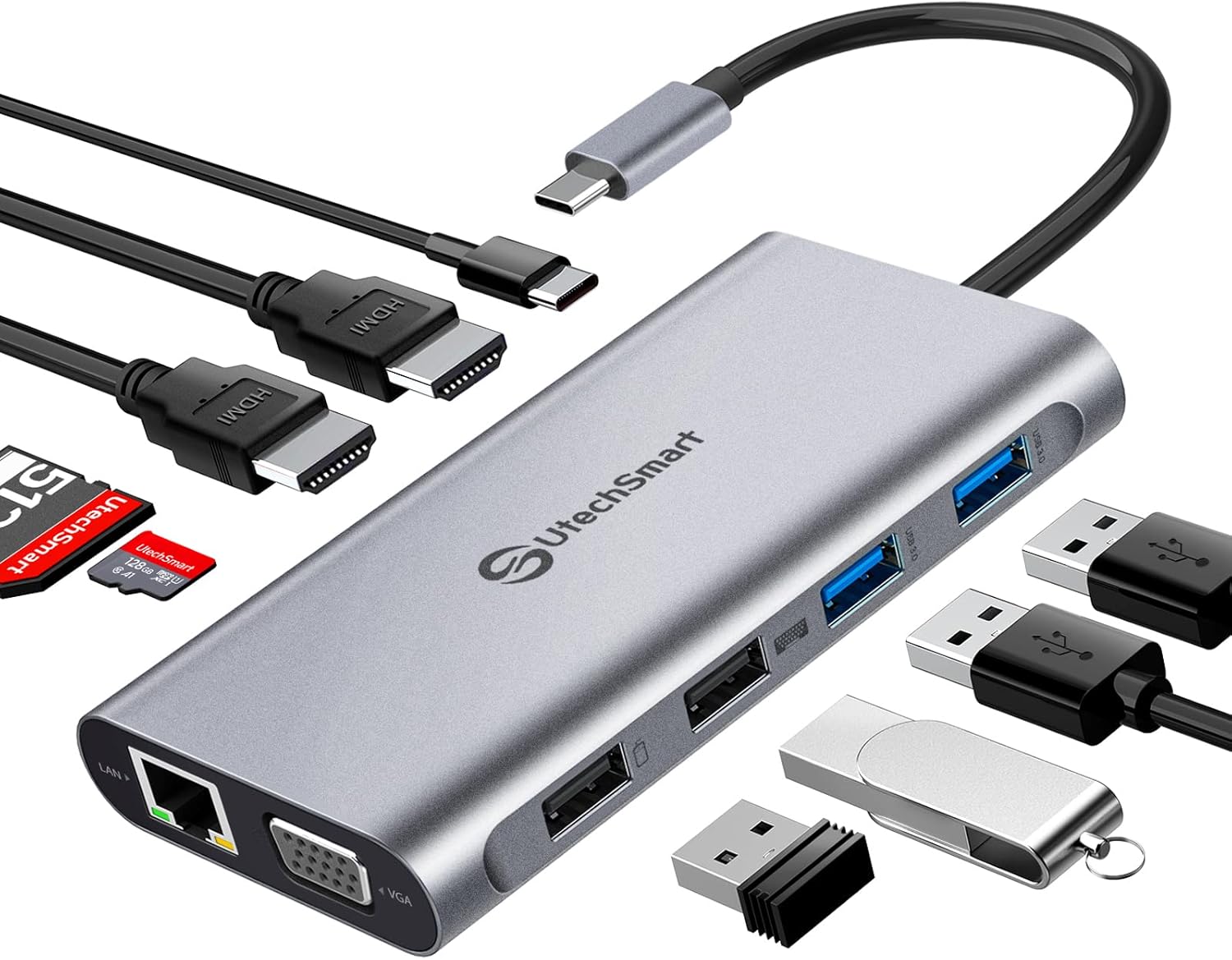
The UtechSmart docking station is packed with a wide variety of ports, making it a true all-in-one solution. It includes:
- 2 × HDMI ports (4K support)
- 1 × VGA port
- USB-C charging port
- Gigabit Ethernet port
- SD and TF card slots
- 2 × USB 3.0 ports
- 2 × USB 2.0 ports
This comprehensive selection allows you to connect virtually all your essential devices, including monitors, external drives, keyboards, mice, and more.
Instead of juggling multiple dongles, you can centralize your entire setup with a single device.
Power Delivery & Smart Safety Features
The docking station supports 100W PD3.0 technology, which helps reduce charging time significantly compared to traditional charging methods. This ensures that your devices stay powered throughout the day, even during intensive tasks.
Additionally, the built-in intelligent microchip enhances safety by providing:
- Overload protection
- Short circuit protection
- Temperature control
These features help protect both your laptop and connected devices, giving you peace of mind during long hours of use.
It’s worth noting that while the dock supports power delivery, it may not provide sufficient power for all laptops depending on their requirements.
Fast Data Transfer & Networking Performance
Speed and reliability are crucial when dealing with large files or high-demand tasks. The UtechSmart docking station delivers solid performance in this area with:
- USB 3.0 ports offering speeds up to 5Gbps
- Additional USB 2.0 ports for peripherals
- SD and TF card slots for quick media access
This makes it ideal for photographers, video editors, and anyone who frequently transfers large amounts of data.
The inclusion of a Gigabit Ethernet port is another major advantage. It provides a stable and fast internet connection, which is especially beneficial for:
- Online gaming
- Video conferencing
- Large downloads
- Streaming
Compared to Wi-Fi, Ethernet ensures lower latency and more consistent performance.
Compatibility & Ease of Use
The UtechSmart docking station is widely compatible with a variety of devices and operating systems. It works with:
- Windows 10 and 11 laptops
- macOS devices
- Chrome OS systems
- Popular models like Dell XPS, Lenovo ThinkPad, and HP Spectre
It also supports devices with USB Type-C Gen 2 or Thunderbolt 3/4 ports that feature DisplayPort Alt Mode.
Setup is incredibly simple thanks to its plug-and-play functionality. There’s no need to install additional drivers—just connect the dock, and you’re ready to go.
Real-World Performance
In real-world usage, the UtechSmart docking station performs reliably across different scenarios. Whether you’re running multiple monitors, transferring files, or connecting several peripherals, the device maintains stable performance.
The triple display feature significantly enhances multitasking capabilities, while the fast data transfer and Ethernet connectivity ensure smooth operation.
Its compact design also makes it easy to switch between workstations without any hassle.
Pros and Cons
Pros
- Triple monitor support for enhanced productivity
- Wide range of ports in one device
- Compact and portable design
- Fast data transfer speeds
- Stable Gigabit Ethernet connection
- Built-in safety features
- Plug-and-play functionality
Cons
- No extended display support on macOS
- 4K limited to 30Hz
- May not fully power all high-demand laptops
Who Is It For?
The UtechSmart docking station is ideal for:
- Professionals working with multiple screens
- Remote workers and freelancers
- Content creators and designers
- Office users handling multiple tasks
- Gamers who need stable internet connectivity
If you’re looking to upgrade your workspace and boost productivity, this docking station is a strong contender.
Final Verdict
The UtechSmart USB-C Docking Station delivers a powerful combination of performance, versatility, and portability. Its triple monitor capability alone makes it stand out in a crowded market, while the wide range of ports ensures you have everything you need in one place.
Although it has a few limitations, particularly for macOS users, it remains an excellent choice for anyone looking to enhance their workflow and streamline their setup.
Conclusion
If you’re tired of limited ports and messy setups, the UtechSmart docking station offers a clean, efficient, and powerful solution. It transforms your laptop into a fully equipped workstation, helping you work smarter and more efficiently.
Upgrade Your Setup Today
Take your productivity to the next level with a docking station that combines power, flexibility, and convenience—all in one compact device 🚀